
Water damage in a DigiTrak Falcon F5 transmitter rarely announces itself. It creeps in, then shows up as corrosion where metal touches metal—threads, springs, and contact surfaces in the battery compartment. That’s the part you can inspect, maintain, and protect in the field.
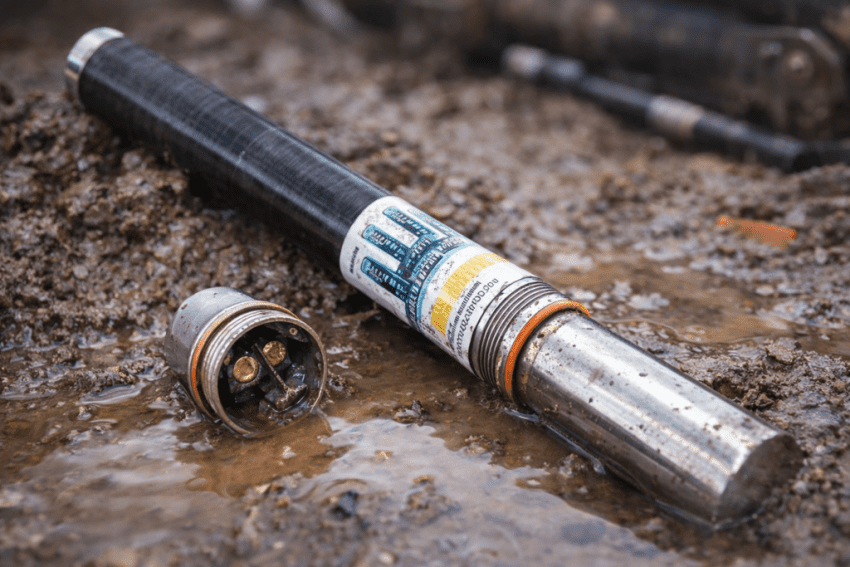
This guide stays inside the manufacturer’s care instructions. It covers what you can safely check and clean, what the manual tells you not to do, and when it makes sense to stop troubleshooting and send the transmitter in for repair. The goal is simple: keep your locating gear reliable and avoid repeat failures.
How water gets into an F5 transmitter and where corrosion starts
Most water intrusion risk centers on the battery compartment. The manufacturer specifically calls out the battery cap O-ring: if it’s damaged, water can enter the battery compartment. That single part is small, cheap, and easy to miss—until it isn’t.
Once moisture gets in, corrosion tends to form on the same surfaces the manufacturer tells you to maintain: the battery compartment spring and the threads in the battery compartment and on the battery end cap. Those areas matter because they affect the quality of the power connection. When oxidation builds up, the connection becomes less dependable, and the cap can become harder to install and remove.
The manual also acknowledges another real-world driver: corrosive and abrasive environmental wear. As a practical safeguard, it notes that taping around the fiberglass tube (if space allows) can help protect against corrosive and abrasive wear. That same instruction includes a critical caution: do not tape over the IR port, because it can interfere with IR communication.
So water and corrosion control for an F5 transmitter is not a mystery. It’s a routine of protecting the seal, keeping contact surfaces clean, and using external protection correctly—without blocking key features.
What to do first when you suspect water entry
Start with inspection, not improvisation. The manufacturer’s guidance gives you a clear first checkpoint: inspect the battery cap O-ring for damage that may allow water to enter the battery compartment. If the O-ring is damaged, replace it. Don’t “make it work” with a compromised seal.
Next, look inside the battery compartment. The same care guidance emphasizes maintaining the spring and threads, which are common sites for oxidation and contamination. If you see corrosion or debris, treat it as a power-connection problem that needs proper cleanup, not a cosmetic issue you can ignore.
Just as important is what not to do. The Falcon guidance is direct: do not use chemicals to clean the transmitter. That rules out a lot of quick “shop tricks” that can leave residues, harm seals, or create new problems. When you clean, follow the approved approach: focus on the spring and threads, remove oxidation carefully, and protect the O-ring.
If you see significant corrosion, repeated binding of the cap, or damage that suggests the compartment has been compromised beyond light oxidation, the safest move is to stop field troubleshooting and plan for repair. The cost of a failed transmitter mid-project is rarely limited to the tool itself.
Corrosion cleanup the manual supports
The safest corrosion cleanup for an F5 transmitter stays in the battery compartment and follows the manufacturer’s care instructions. The goal is to restore a solid power connection by keeping the spring and threads clean and free of oxidation.
The guidance is specific about what to clean: periodically clean the spring and threads in the battery compartment and on the battery end cap. If you see oxidation, remove it using an emery cloth or a wire brush. That’s straightforward, but it comes with an important handling detail: do not damage the O-ring. If you need to clean close to the seal area, remove the O-ring first so you don’t nick it or grind debris into it. Then reinstall a good O-ring after the cleaning is done.
After you remove oxidation, the manufacturer recommends using a conductive lubricant on the battery cap threads to keep the cap from binding. The manual also notes that transmitters ship with a nickel-based anti-seize lubricant on the battery end cap to aid electrical contact and grounding. In plain terms: clean metal-to-metal contact matters, and lubrication is part of keeping that contact reliable and the cap serviceable.
What you should not do is just as clear: do not use chemicals to clean the transmitter. Stay with the approved mechanical cleanup on the spring and threads, protect the O-ring, and keep the cap operating smoothly.
Preventing repeat water intrusion and corrosion
Prevention on an F5 transmitter comes down to three manufacturer-backed habits: protect the O-ring, maintain the contact surfaces, and apply external protection correctly.
First, treat the battery cap O-ring as a routine inspection item. The care guidance explicitly ties O-ring damage to water entry into the battery compartment. That makes the decision simple: if the O-ring is damaged, replace it. A damaged O-ring is not something to “watch.” It’s something to fix.
Second, keep the battery compartment spring and threads clean. The manufacturer’s care instructions recommend periodic cleaning of the spring and threads in the compartment and on the battery end cap. When oxidation appears, remove it with an emery cloth or wire brush, taking care not to damage the O-ring. Then protect the threads so the cap doesn’t bind—using a conductive lubricant on the battery cap threads as recommended.
Third, protect the transmitter body against corrosive and abrasive environmental wear. The manual notes that taping around the fiberglass tube (if space allows) can help. But it also gives a sharp boundary: do not tape over the IR port, because tape can interfere with IR communication. That one mistake can create a new failure while you’re trying to prevent another.
These steps are simple, but they work because they target the specific parts the manufacturer identifies as water paths and corrosion points.
When field maintenance isn’t enough and repair makes sense
Some problems are maintenance problems. Others are repair problems. Water entry and corrosion can be either, depending on severity—and guessing wrong can cost you more than a bench repair.
The manufacturer publishes a warning that using repaired locating products can introduce significant project risk. That warning is a reminder that reliability matters. If a transmitter has been compromised by water intrusion and corrosion, you want a repair process that restores dependable performance—not a patch that fails later when the job is on the line.
At that point, repair becomes the practical choice. UCG HDD provides DigiTrak Falcon F5 transmitter repair as part of its underground locating equipment repair services. If your transmitter shows corrosion beyond light oxidation, if the cap keeps binding even after proper cleaning, or if you can’t trust the battery compartment seal, sending it in for evaluation and repair is safer than repeated field attempts.
Warranty status can also affect your decision. The manufacturer’s warranty terms state that a Falcon transmitter has a 3-year / 500-hour warranty period when it is registered within 90 days; otherwise, warranty coverage is 90 days from purchase. If you’re unsure, verify how the unit was registered and then choose the route that gets you back to a reliable transmitter with minimal downtime.
The bottom line: follow the approved care steps in the field. When the tool’s condition suggests deeper compromise, move to professional repair so the transmitter comes back dependable—because that’s what keeps bores moving.