
Remember that time you bought a couch online, waited three weeks for delivery, and when it finally arrived… It looked totally wrong in your living room?
Yeah, me too.
The color wasn’t quite right. The scale was off. And somehow, what looked amazing in those professional photos just didn’t work in your actual space with your actual life happening around it.
Well, here’s the good news: technology has finally caught up with our furniture-buying struggles. And honestly? It’s kind of amazing.
What Is This AR Thing Anyway?
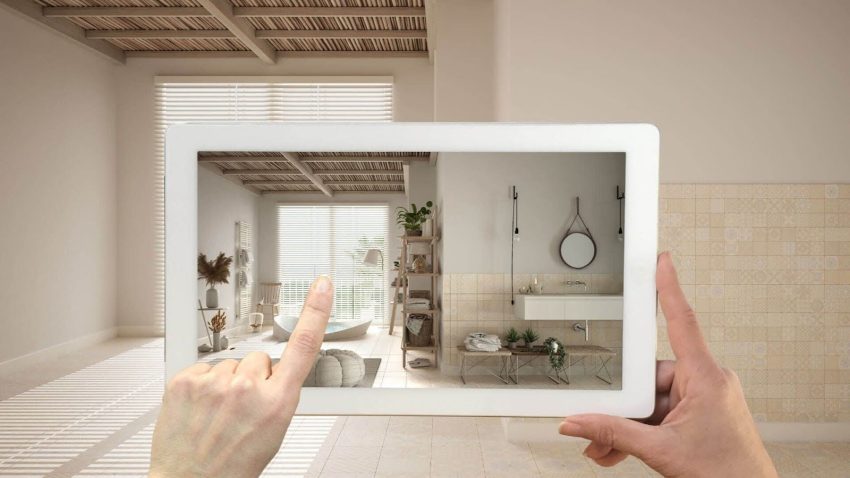
AR stands for augmented reality, which sounds super technical and complicated. But really, it’s just a fancy way of saying “see stuff in your space before you buy it.”
You know those Instagram filters that put funny sunglasses on your face? Same basic idea, except instead of sunglasses, it’s a sofa. And instead of your face, it’s your living room.
Here’s how it works: You point your phone camera at a spot in your room, and the app shows you exactly how that piece of furniture would look right there in your actual space. You can walk around it, look at it from different angles, and see if it actually fits where you think it will.
It’s like having a crystal ball, except this one actually shows you the truth instead of making stuff up.
Why This Is a Game-Changer for Busy People
Look, I don’t know about you, but I don’t have time to drive to five different furniture stores with my kids in tow, measure everything seventeen times, take a million photos, go home, debate with my partner about whether it’ll work, drive back to the store, find out they’re sold out of that color, and then start the whole process over again.
That’s exhausting just reading it, right?
With AR furniture preview, you can:
- Test furniture in your space during nap time
- Try different styles without leaving your couch
- Show your partner exactly what you’re thinking without explaining it forty times
- Avoid that horrible moment when the delivery guys are standing in your doorway with a sofa that clearly won’t fit
Plus, you can do all of this while wearing pajamas. Which, let’s be honest, is the dream.

How to Actually Use AR for Furniture Shopping
Okay, so you’re sold on the idea. Now what?
Step 1: Find Apps That Offer AR
Lots of major furniture retailers now have AR features built into their apps. IKEA has one. Wayfair has one. Even some smaller stores are getting on board.
Download a few and see which one you like best. They’re all free, so there’s no risk in trying them out.
Step 2: Clear Some Space
This sounds obvious, but trust me: you need to clear the area where you’re thinking about putting furniture. The AR works best when it can see your actual floor.
Move the laundry basket. Shove that pile of toys to the side. Get the dog out of the frame.
Step 3: Point and Preview
Open the app, select the piece of furniture you’re interested in, and point your camera at the space. The app will show you how it looks.
Walk around it. Look at it from the doorway. Imagine actually using it. Does it block the walkway? Does it look weird next to your existing stuff?
This is where the magic happens, because you’re not guessing anymore. You’re seeing.
Step 4: Take Screenshots
Here’s a pro tip: take screenshots of everything you try. Later, when you’re trying to remember which chair you liked better, you’ll have photos to compare.
Plus, you can send these to your mom/sister/best friend and get their opinion without making them come over.
Real-Life Ways AR Has Saved People’s Sanity
I’m going to be real with you here. The first time I used AR to preview furniture, I was skeptical. I thought it would be gimmicky and not actually helpful.
I was so wrong.
Here’s what happened: I needed a new coffee table. Found one online that looked perfect. Used AR to preview it. Realized immediately that it would block the path to the kitchen.
The crisis was averted without spending a single dollar.
My friend Sarah used it to find a bookshelf that actually fit in her awkward corner space. She tried seven different options in about twenty minutes. At a store, that would have taken all afternoon and probably ended in tears.
Another friend realized the bed frame she wanted would leave literally zero room to walk around it. The AR showed her this before she spent $800 on something that wouldn’t work.
These are real situations where technology stopped us from making expensive mistakes.
The Secret Behind AR That Makes It Work
You might be wondering how your phone can show you such realistic images of furniture in your space. The answer involves something called 3D modeling for augmented reality, which is basically the process of creating detailed digital versions of furniture that look real when placed in your room.
These models include accurate dimensions, colors, textures, and even how light reflects off the materials. It’s pretty impressive when you think about it.
The better the 3D model, the more realistic the preview looks. That’s why some apps show furniture that looks almost photograph-quality, while others look more like video game graphics.
What AR Can’t Do (Yet)
Okay, let’s be honest here. AR is awesome, but it’s not perfect.
It can’t tell you if a couch is comfortable. You still need to test that in person or read a lot of reviews.
It won’t show you exactly how that fabric will hold up to kids, pets, and spilled coffee. That’s still a guess.
And sometimes, the colors on your phone screen don’t match exactly what you’ll see in person. Lighting matters, and screens aren’t perfect.
But for figuring out if something will fit and look good in your space? It’s brilliant.
Tips for Getting the Best Results
Use Good Lighting
AR works better in well-lit rooms. Turn on the lights. Open the curtains. Natural light is your friend here.
Measure Anyway
I know, I know. The whole point is to not have to measure. But trust me, measure the space anyway. Apps can glitch. Technology can be weird. A quick measurement takes thirty seconds and saves potential heartache.
Try Multiple Options
Don’t just preview one thing. Try different styles, colors, and sizes. You might be surprised by what actually looks good.
Check from Different Angles
Walk around the room. Look at it from where you’ll actually see it most. From the couch. From the doorway. From your favorite chair.
Trust Your Gut
If something feels off in the AR preview, it’ll probably feel off in real life. Your instincts are good. Listen to them.
Making Decisions Without the Pressure
Here’s my favorite thing about using AR: there’s zero pressure.
At a store, you’ve got salespeople hovering. You feel like you should make a decision. There’s that awkward “let me think about it” moment when you both know you’re not coming back.
With AR, you can try that purple chair at 10 PM on a Tuesday and nobody cares. You can preview seventeen different coffee tables and change your mind forty times.
No judgment. No rush. Just you, your phone, and your space.
The Money You’ll Save
Let’s talk about the practical side here.
Returns are expensive. Shipping furniture back is a nightmare. And sometimes, stores won’t even take returns on large items.
If AR helps you avoid even one wrong purchase, it’s paid for itself. (Well, it’s free, so it’s even better than that.)
Plus, when you can see exactly what will work, you stop second-guessing yourself. No more buying three different options “just to be safe” and then dealing with returns.
Getting Your Family On Board
If you’re making decisions with a partner, AR is a relationship saver.
Instead of: “I think this will look good.” “I don’t know, it seems too big.” “No, it’ll be fine.” “Are you sure?”
You get: “Look, here’s how it actually looks.” “Oh, yeah, that works.”
Conversation over. Crisis averted. Peace restored.
Even kids can get involved. Let them see what the new playroom furniture will look like. They’ll have opinions, and at least you’ll know what you’re dealing with.
When to Still Go to the Store
AR is amazing, but sometimes you still need to see and touch furniture in person.
Go to the store when:
- Comfort is the main factor (sofas, chairs, beds)
- You’re unsure about fabric quality
- The item is super expensive and you want zero doubts
- You just like browsing in person
But even then, use AR first to narrow down your options. Walk into the store knowing exactly which three sofas you want to try, instead of being overwhelmed by fifty options.
The Future Is Here and It’s Pretty Cool
I’ll be honest: when I first heard about AR furniture shopping, I thought it was going to be one of those things that sounds good but doesn’t actually work well.
But it does work. Really well.
It saves time, money, and stress. It makes furniture shopping actually enjoyable instead of exhausting. And it means you can make confident decisions without the guesswork.
Is it perfect? No. But it’s pretty darn good.
Will you still make mistakes sometimes? Sure. We’re all human.
But will you make fewer mistakes than you would have otherwise? Absolutely.
Final Thoughts
Here’s the thing about furniture shopping: it’s supposed to be fun. You’re creating a space you love. You’re making your house feel like home.
AR takes away the stressful parts and leaves the good stuff. Dreaming. The planning. The excitement of knowing something’s going to look amazing.
So next time you’re scrolling through furniture websites at midnight (we’ve all been there), download an AR app. Give it a try. Point your camera at that empty corner you’ve been trying to figure out for months.
You might be surprised at how quickly you find exactly what you’ve been looking for.
And the best part? You’ll know it’s going to work before you spend a single dollar.
That’s worth downloading an app for, right?